Which 3D Printer Works for Prototypes at Home?
A prototype that looks great on a desk can still fail the real test: Does the clip flex without snapping? Does the enclosure hold its dimensions? Can you revise it, print it again, and get back to testing before the day is over? If you are asking which 3D printer works for prototypes, the best answer starts with what your part needs to prove - not with the printer’s headline resolution.
For home makers, product designers, engineers, and ambitious hobbyists, 3D printing makes development faster and more hands-on. The right machine can turn a CAD idea into a testable part overnight. The wrong one can add avoidable cleanup, material limits, and repeat prints to every iteration.
Which 3D printer works for prototypes by type?
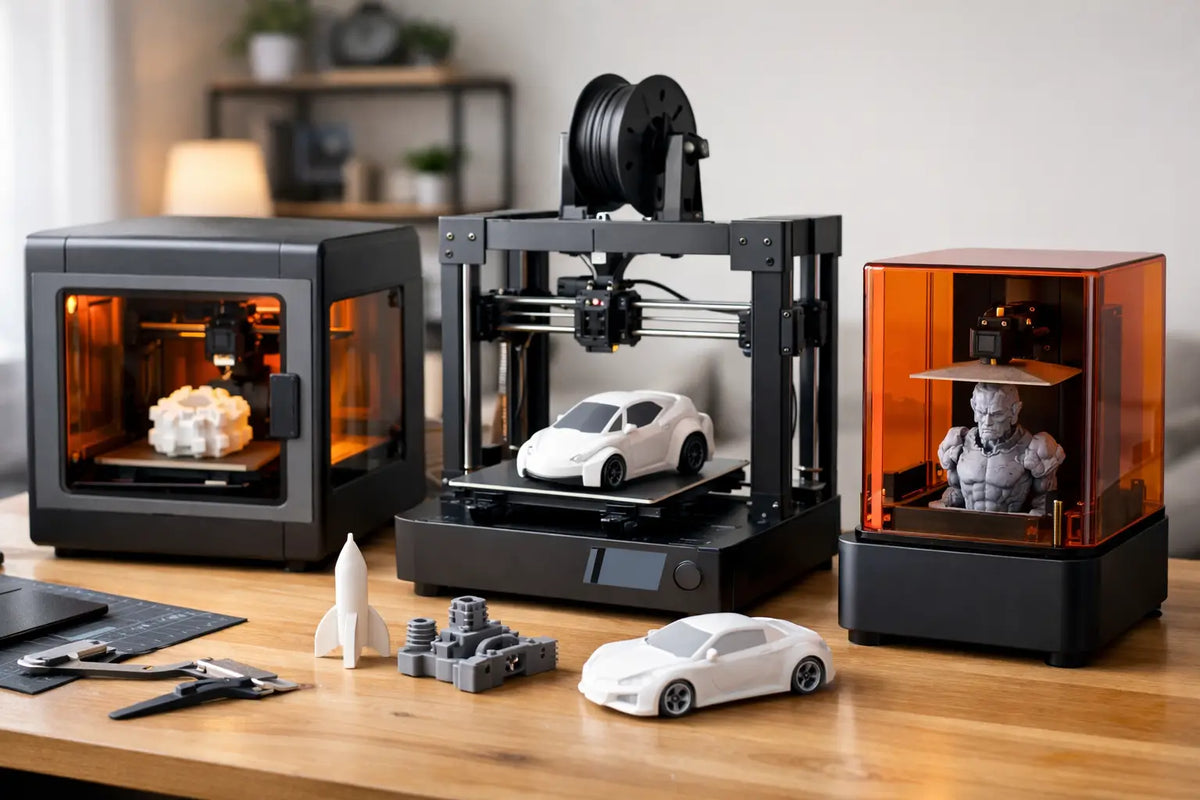
Three printing technologies cover most prototype needs: FDM, resin, and SLS. Each creates parts differently, which affects strength, surface finish, operating cost, and how much work happens after the print is done.
FDM printers: The versatile prototype workhorse
FDM, or fused deposition modeling, builds parts by melting and placing thermoplastic filament layer by layer. It is the technology most people picture when they think of a desktop 3D printer, and it remains the practical first choice for a wide range of functional prototypes.
An FDM printer is especially strong when you need enclosures, brackets, mounts, organizers, fixtures, replacement pieces, jigs, and mechanical concepts. Materials such as PLA, PETG, ABS, ASA, TPU, nylon, and carbon-fiber-filled filaments give designers plenty of room to match a prototype to its job. PETG handles everyday impact and moisture better than PLA. TPU adds flexibility for grips, bumpers, and protective components. Nylon and reinforced filaments can support more demanding functional testing when printed on a capable machine.
FDM also offers a favorable cost per part, accessible materials, and generous build volumes. That matters when you are printing an RC component, a drone accessory, a gaming setup add-on, or a full-scale housing rather than a tiny display model.
The trade-off is visible layer texture and directional strength. A part can be very strong in one orientation and more likely to split along layer lines in another. Good slicer settings, adequate walls, sensible infill, and print orientation matter as much as the printer itself. For many functional projects, this is not a drawback - it is part of designing intelligently for additive manufacturing.
Resin printers: Best for fine detail and visual validation
Resin printers use light to cure liquid photopolymer resin. Their strengths are crisp edges, smooth surfaces, tiny text, intricate features, and highly detailed forms. If your prototype is a miniature, tabletop game piece, jewelry concept, dental-style model, highly detailed character, or a product form that needs a premium presentation, resin can deliver results that FDM cannot easily match.
Resin is also valuable for checking ergonomics and appearance. A small controller component, decorative panel, or compact consumer-product concept can look impressively close to a finished part after washing, curing, and light finishing.
But resin printing is not automatically the best choice for working prototypes. Standard resin can be relatively brittle, and even engineering resins have material-specific limitations. The process also requires gloves, ventilation awareness, washing, curing, and responsible handling of uncured resin and cleaning materials. That workflow is manageable in a dedicated maker space, but it is less casual than loading a spool of filament.
Choose resin when detail and surface quality define success. Choose an engineering resin only after confirming its mechanical properties suit the test you intend to run.
SLS printers: Professional-grade nylon parts without supports
Selective laser sintering, or SLS, fuses nylon powder into solid parts. It is a serious option for production-minded prototyping because nylon components can be durable, complex, and functional. Since surrounding powder supports the print during fabrication, SLS can create internal channels, interlocking forms, and intricate geometries without the support structures common with FDM and resin.
This makes SLS compelling for short-run functional components, fit checks across assemblies, and designs that are difficult to produce on a desktop machine. The surface is typically matte and slightly grainy, rather than glossy, but it can be finished when appearance matters.
The consideration is investment and workflow. SLS equipment, powder handling, unpacking, and post-processing require more space, planning, and budget than most FDM setups. It is an excellent fit for a professional studio, advanced workshop, or creator business with frequent functional-print demand. For occasional home prototyping, a premium enclosed FDM system often provides more immediate value.
Start with the prototype’s job, not the print technology
Before comparing specs, identify what you need to learn from the part. A proof-of-concept print answers, “Will this idea fit, move, or feel right?” A functional prototype asks, “Will it survive use?” A presentation prototype asks, “Will people understand and respond to the design?” Those are different jobs, and they can require different materials or printers.
For fit and dimensional checks, a well-calibrated FDM printer using PLA or PETG is usually efficient. For a snap-fit housing, a tougher material such as PETG, ABS, ASA, or nylon may be the better route. For flexible wearables and protective parts, TPU is the natural candidate. For a polished miniature or detailed cosmetic component, resin moves to the front.
Do not confuse maximum resolution with prototype accuracy. Resolution refers to fine layer height or pixel detail, while accuracy depends on calibration, material shrinkage, geometry, temperature, and process control. A printer that consistently produces a dimensionally reliable 0.2 mm layer-height part is often more useful than one capable of ultra-fine settings that take much longer and demand perfect conditions.
Features that make iteration faster
A prototype printer should earn its space by reducing friction between versions. Look beyond a flashy spec sheet and prioritize features that make repeated prints dependable.
An enclosed FDM printer is worth serious consideration if you expect to use ABS, ASA, nylon, or other materials affected by drafts and temperature swings. The enclosure helps maintain a stable printing environment and can improve consistency. For PLA, it is less essential, though still convenient in a busy home workshop.
Automatic bed leveling and reliable first-layer performance are major quality-of-life features. Failed first layers waste time, filament, and momentum. A flexible build plate also speeds up part removal and gets your next revision started sooner.
High-temperature nozzles and heated beds expand material options, but only buy that capability if you plan to use it. If your prototype work is mostly organizers, brackets, basic housings, and display parts, a dependable PLA and PETG workflow may serve you better than an advanced material setup you rarely use.
For resin printers, pay attention to build volume, screen resolution, wash-and-cure requirements, ventilation, and availability of tough or flexible resins. A larger build area can be valuable, but a compact, high-resolution machine may be the smarter choice for detailed models and small product concepts.
Material selection can matter more than the machine
The same FDM printer can produce a stiff PLA mockup, a weather-resistant ASA mount, and a flexible TPU bumper. That versatility is why material planning belongs at the beginning of the buying process.
PLA is easy to print and ideal for concept models, visual prototypes, and indoor fit checks. PETG is a strong next step for practical parts because it offers good durability and chemical resistance without the printing demands of ABS. ABS and ASA suit heat-exposed or outdoor applications, although they benefit from enclosure control and proper ventilation. TPU is for flexibility. Nylon is a performance material for parts that need toughness and wear resistance, but it absorbs moisture and requires more careful preparation.
For parts that will carry real load, test conservatively. A 3D-printed hook, bracket, or mount should not be treated like an injection-molded equivalent without validation. Print multiple orientations, increase wall count, and test failure points before relying on it for valuable equipment or safety-sensitive use.
Build a prototype workflow that matches your space
The best printer is also one you can operate comfortably. FDM needs a stable surface, filament storage, and basic ventilation. Resin needs a more controlled workspace with personal protective equipment, washing and curing stations, and a plan for consumables. SLS needs dedicated room and disciplined powder management.
For many home creators, an enclosed FDM printer paired with PLA, PETG, and TPU is the high-performance starting point. It supports fast iteration across gaming accessories, workshop tools, custom mounts, drone components, home automation housings, and countless original projects. Add a resin printer later if your work starts demanding miniature-scale detail or showroom-ready surfaces.
At Your Tech Haven, the goal is to help creators choose future-ready tech that fits the way they actually build. A printer with the right material range, dependable calibration, and a workflow you will use every week is more valuable than the most advanced machine on paper.
Your first prototype does not have to be perfect. It has to teach you something quickly. Choose the printer that makes that next revision easy, and your ideas will move from screen to real-world testing with far more confidence.